Do a move-in inspection with your iPhone: how RoomLedger records it
Walk each room with RoomLedger: rate every line, take photos, read the meters and sign a dated move-in condition report on your iPhone, with no account needed.
Short answer
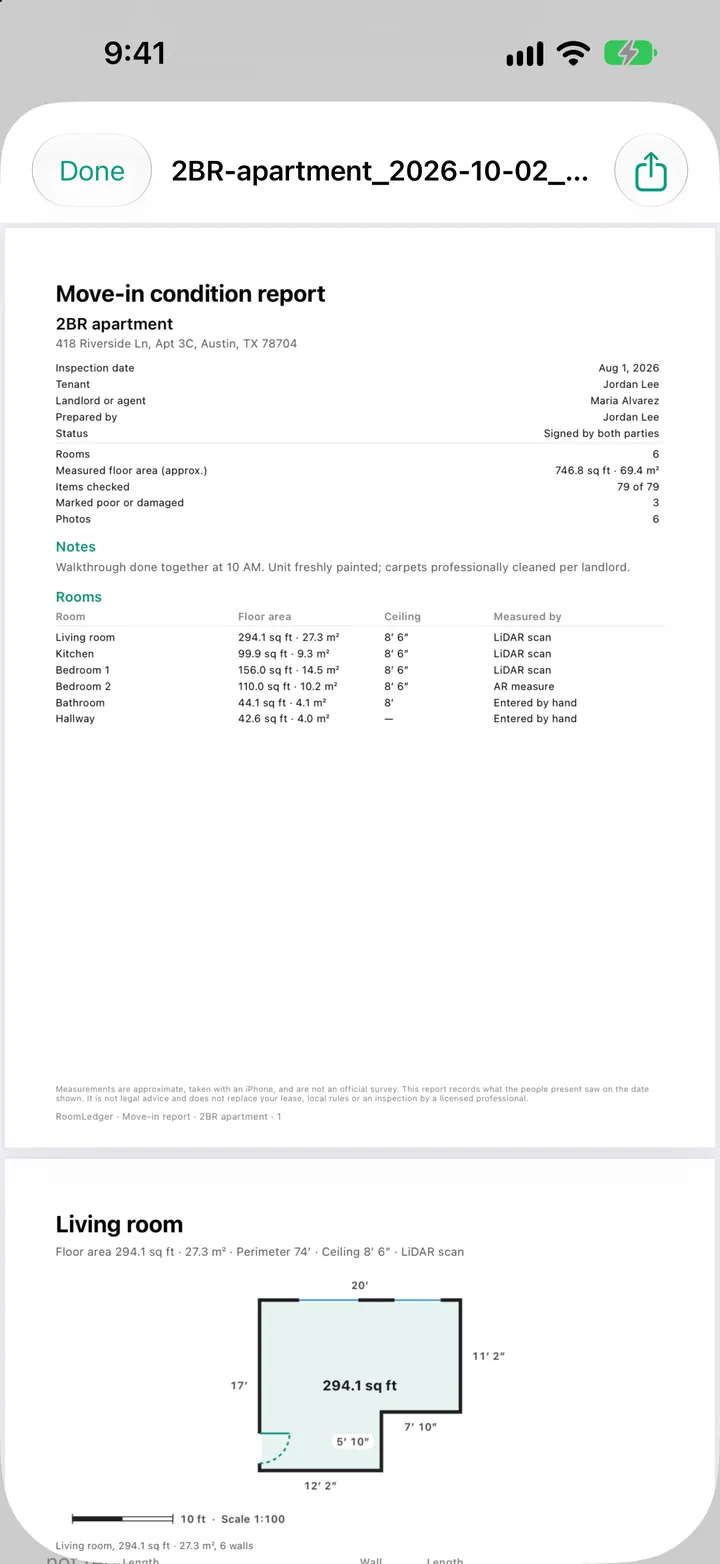
In RoomLedger you add your home and its rooms, then start a Move-in walkthrough. You go room by room, rate each checklist line from Good to Damaged, add photos and notes, record meters and keys, and both of you sign on the iPhone. The result is a dated condition report PDF with a SHA-256 fingerprint for every photo. Everything stays on the iPhone; there is no account.
The day you get the keys is the cheapest moment to protect a deposit. Scuffs, stains and a loose cabinet door are easy to see in an empty home and hard to prove a year later. RoomLedger turns that first walk-through into a structured record that you can compare with the move-out, line by line. It works the same whether you rent, let or manage the home.
Before you start: the home and its rooms
Tap Add a home on the Homes tab and choose the type: Apartment, House, Condo, Townhouse, Room in a shared home or Other. Then add the rooms. The room type matters, because it sets the checklist: a kitchen gets lines like Countertops and backsplash and Dishwasher, a bathroom gets Toilet and Tile, grout and caulk.
Measuring is optional but useful. On iPhones with a LiDAR Scanner you can scan a room in about a minute and get a floor plan; on any iPhone you can use AR measure or type the size from a tape measure. See scanning a room with LiDAR and measuring without LiDAR. Measurements are approximate and are not an official survey.
Record a move-in walkthrough
- Open the home and tap Start a walkthrough, then choose Move-in.
- Open the first room. Rate each line Good, Fair, Poor or Damaged, or N/A when the room doesn't have it.
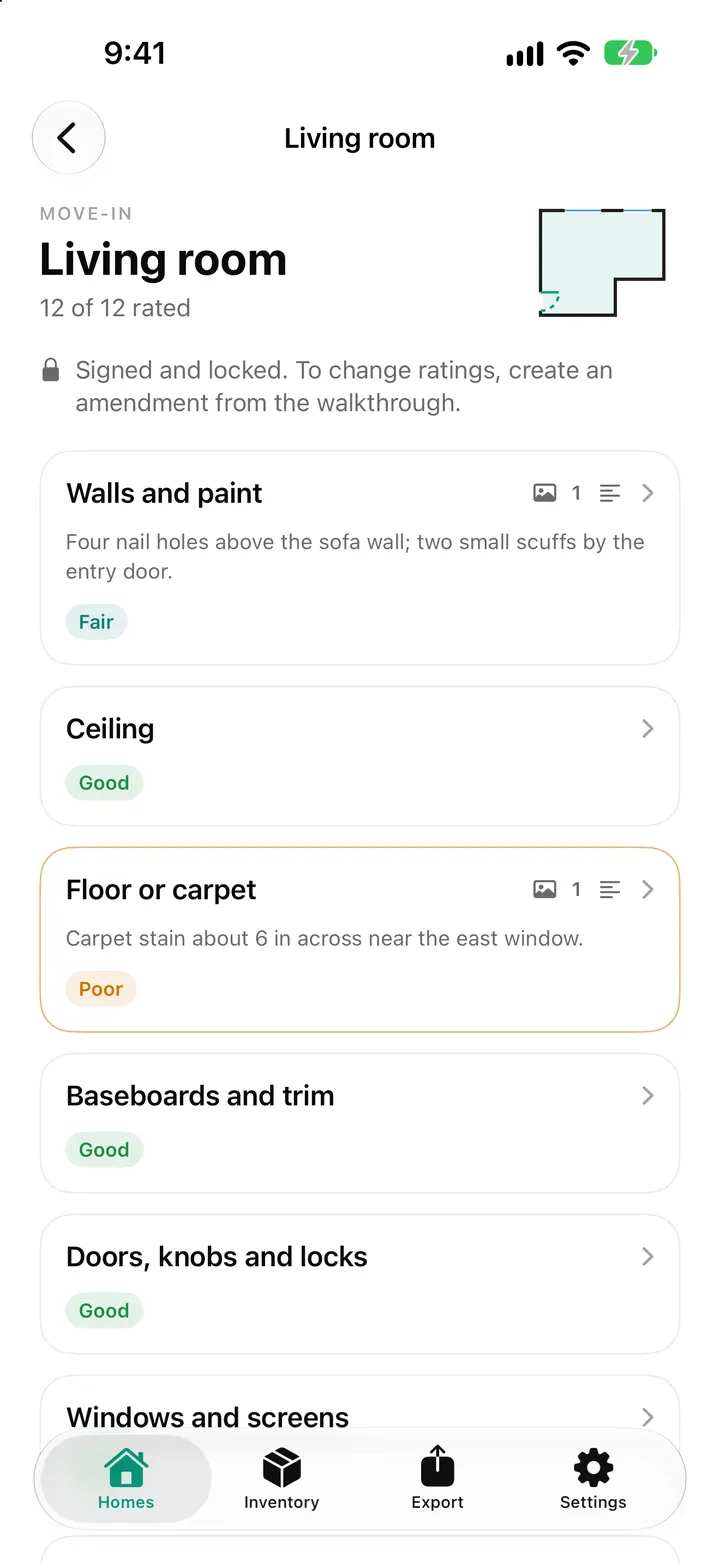
- For anything that isn't good, add a photo and a short note, such as Carpet stain about 6 in across near the east window.
- Take the suggested shots: the four corners, the floor, the ceiling, a window and the door.
- When a room is fine, tap Mark the rest Good to finish the remaining lines in one go.
- Open Meters and keys, photograph each meter and enter the readings, and count the keys.
- Add the people: the tenant and the landlord or agent sign on screen under Sign here.
- Tap Export PDF report and share the PDF with the other party.
Rating the rooms
Every room opens as a checklist. The base lines cover the parts every room has: Walls and paint, Ceiling, Floor or carpet, Baseboards and trim, Doors, knobs and locks, Windows and screens, light fixtures and outlets. Room types add their own. If the room has something the list doesn't, use Add a line.
Ratings Poor and Damaged count as issues, and the walkthrough page shows how many. You also give each room a cleanliness rating, from Professionally cleaned to Dirty, because cleaning charges are a common deposit question. The checklist and ratings post goes through each option.
Photos that hold up
Photos are taken inside the walkthrough, so each one is tied to a room and a line. Mark up lets you circle the problem; the original photo is kept alongside the marked-up copy. If you add a picture from your library, the report labels it from library and keeps the date from the photo file. RoomLedger also warns you when a shot is blurry or too dark, before you leave the room.
In the PDF, photos are numbered (P01, P02 and so on) and listed with a SHA-256 fingerprint. If a photo file is edited, even slightly, its fingerprint changes. More on this in the condition report PDF post.
Meters, keys and signatures
Under Meters and keys you record electric, gas, water or other meters. Read the meter with the camera reads the digits live, and you check the reading before it's saved; the meter photo is kept. If you try to sign without every reading, RoomLedger asks first.
Both the tenant and the landlord or agent type their full name and sign with a finger. A witness or an agent can sign too. Once both required parties have signed, the app shows Signed by both. The report is locked. A signed report is never edited: changes go into an amendment that both of you sign again. If the other person isn't there, Sign on another iPhone sends the walkthrough over AirDrop or Files. See signing and amendments.
FAQ
Do both people need to be in the same room to sign?
No. Sign on another iPhone sends the walkthrough as a file over AirDrop or Files. The other iPhone checks that it is the same data, signs and sends it back.
Can I change a rating after we signed?
Not in the signed report. Create an amendment from the walkthrough; both of you sign it, and the earlier version stays on file with its signatures.
Does RoomLedger work without LiDAR?
Yes. Room scanning needs an iPhone with a LiDAR Scanner, but walkthroughs, photos, signatures, reports and inventory work the same on any iPhone. You can measure with AR or type the size.
Is the move-in report a legal document?
No. It is a dated record of what you both saw, with photos and signatures. Check your lease and local rules for what your landlord or tenancy requires.
Download RoomLedger and walk through your home before you unpack.
Keep reading
Room checklists and condition ratings in RoomLedger: Good, Fair, Poor, Damaged
How RoomLedger builds a checklist for each room type, what Good, Fair, Poor, Damaged and N/A mean, how issues are counted, and shortcuts that speed things up.
ReadSign a condition report on iPhone, then fix it with an amendment instead of an edit
Tenant and landlord sign the RoomLedger report on screen, which locks it. Later changes go into an amendment both sign again, and earlier versions stay on file.
Read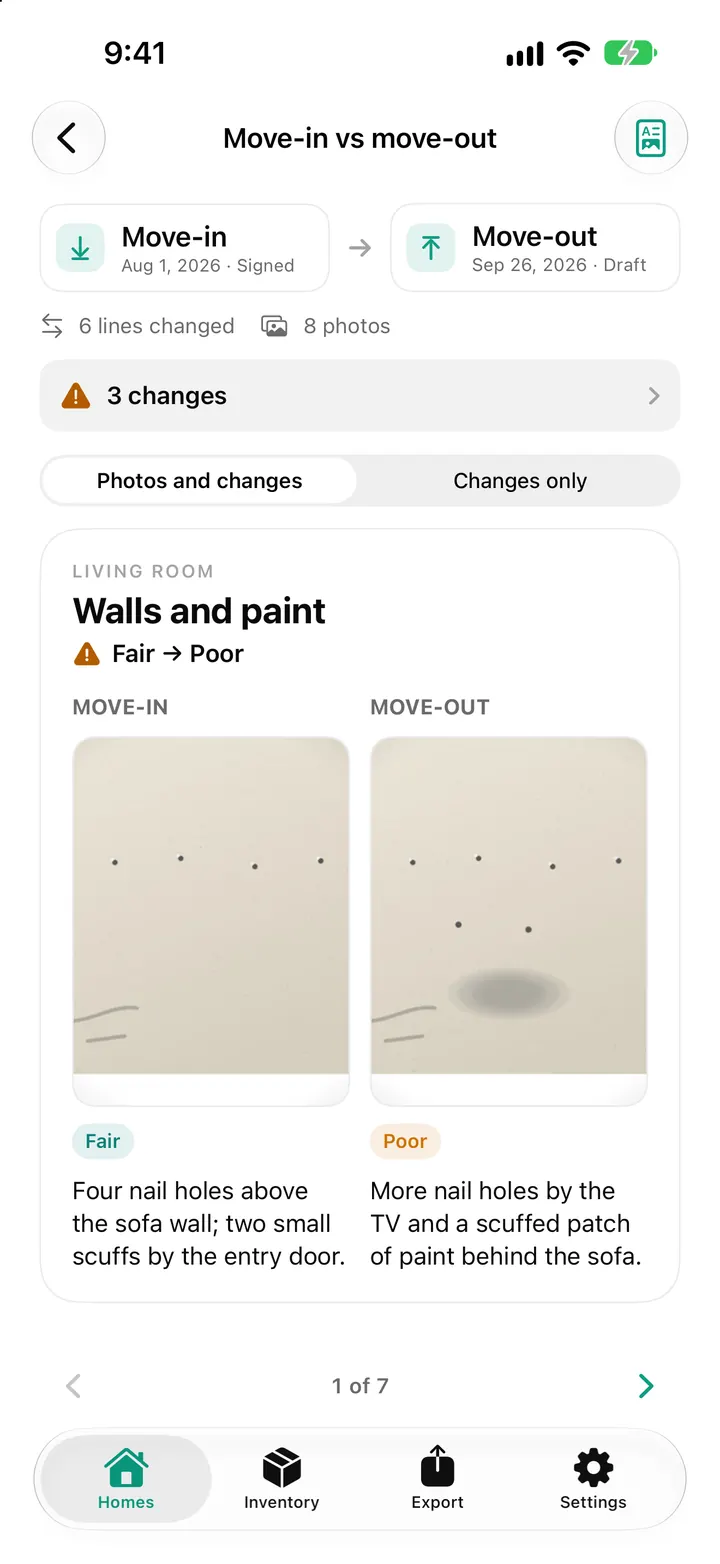
Compare move-in and move-out side by side, line by line, with photos from both days
RoomLedger pairs each move-out line with the signed move-in, shows both photos with their dates, flags what got worse and exports it all as a Comparison PDF.
ReadHow to Record Each Room’s Condition at Move-In
Record rental move-in condition with room photos, captions, locations, equipment and a dated RoomLedger report.
Read guide